
Interface to the Post API from Sage 100
With the L100 Post module
Print postal-compliant label
Generate tracking number of the mail
Check shipping address

Print a prepaid label directly from an address
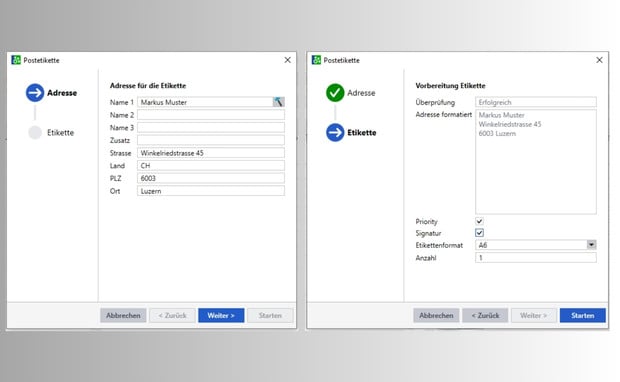
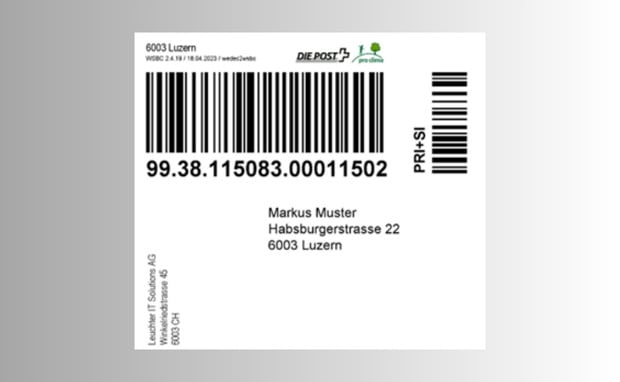
The L100 Post module prints a prepaid postal label from address master data. It automatically formats the address fields in the appropriate address format. The "Priority" and "Signature" options adapt the label to the respective consignment. They are printed directly onto the label. Various label formats from A5 to A7 enable further individualization.
Create and track a prepaid label directly from a receipt.
As with the address, you can also create a postal label from the sales document (e.g. delivery bill). The same options are available here. In addition, Swiss Post generates a tracking number from the receipt when the label is created. This is assigned to the receipt and can be communicated to the customer for parcel tracking. The customer tracks the shipment on the Swiss Post website.
Address verification by Swiss address card index
A correct address is required for label printing. L100 Post therefore checks every address for accuracy before printing. L100 Post uses the official Swiss Post address database to check the street, house number, zip code and town. This ensures that the address on the label reaches the recipient and that the consignment arrives. Incorrect or non-existent addresses cause returns. These can be significantly reduced as a result.
Advantages of L100 Post
Direct connection to the post office
Print franked label
Generate tracking numbers in the documents
Address verification for fewer returns
Fast and flexible transmission
Personal Consultation
Reto Hofstetter and his team specialize in all matters related to the Sage 100 business software. As a certified Sage Competence Center and certified Sage Developer Partner, he handles all aspects of implementing and customizing your business software. Contact us today!