


Skip to navigation Skip to search Skip to content
Contact

Automatic PDF filing in Sage100

With the L100 PDF module

L100 PDF Logo

The L100 PDF module automatically stores documents that are created in the Sage 100 business software. It ensures access to documents in a central repository in the file system. All employees can access the documents without having to log in to Sage 100.

Access to receipts without Sage 100 login

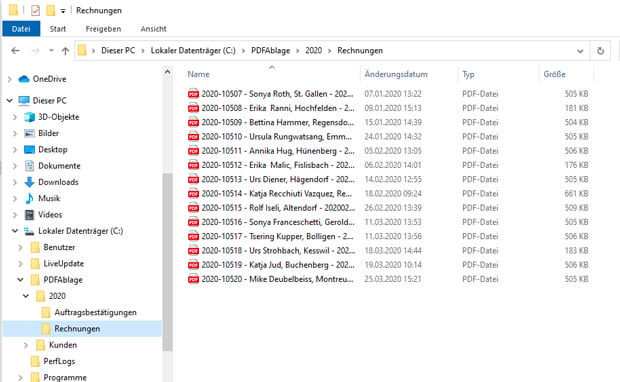
The L100 PDF module automatically stores receipts in the appropriate folders when printing. All employees of the company can access the documents created. A Sage 100 login is not required as the documents are stored outside of Sage 100.

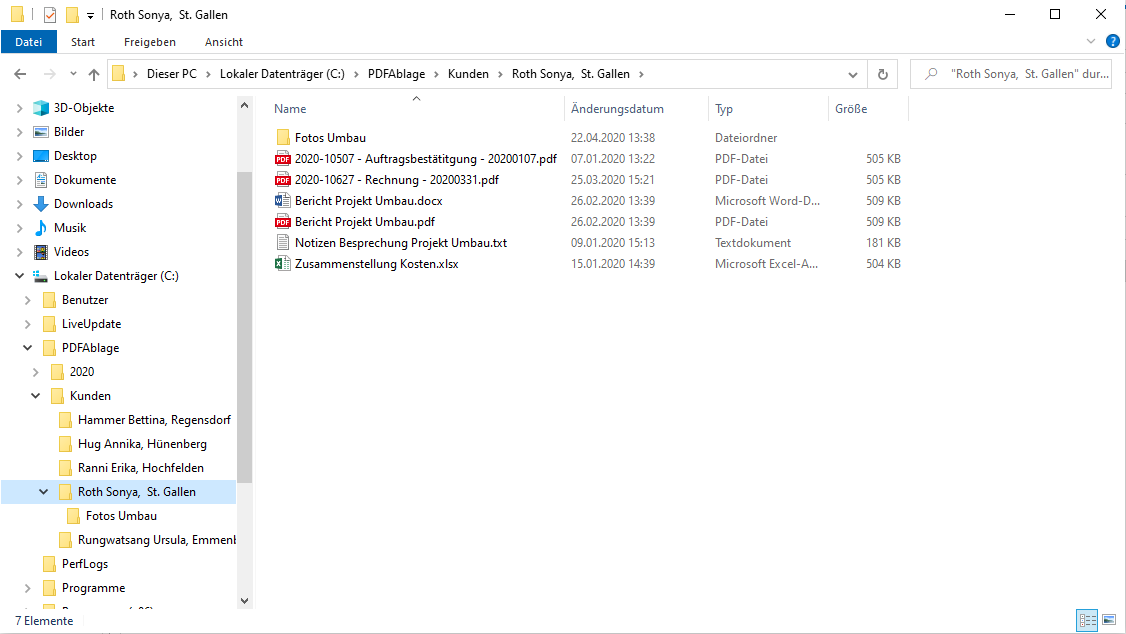
All documents are clearly stored in the folder structure you have defined. This creates a central filing archive that is organized by customer or project, for example, to store additional documents. Searching for a document for a customer or project is easy and efficient using the search function in the file system. This makes your employees' work easier.

Folder structure

Print process triggers automatic document storage in the L100 PDF module

With the L100 PDF add-on module, document storage is fully automated. The module has been specially developed for Sage 100. It stores purchase and sales documents efficiently and automatically with the printing process.

As soon as the printing process starts, L100 PDF saves the documents, names the files and assigns them to the correct folder. These processes run fully automatically in the background. There is no administrative work for employees.

L100 PDF either independently creates a complete archive with an individual folder structure or integrates itself into an existing archive.

Advantages of L100 PDF

Solution with various filing options per document

Time savings through automation of various documents

Maximizing productivity and transparency

Convenient compilation of a central archive for all users

Minimization of the administrative burden

Avoidance of errors through continuous filing

Business process optimization through shadow copies

Support and tracking for revisions

Solve data storage with L100 PDF

Storing files in an archive is tedious and time-consuming. Nevertheless, it is important to maintain data storage, whether physical or electronic. On the one hand, there are legal reasons for this: based on the data retention obligation, tax-relevant documents such as invoices and business correspondence must be stored securely for at least ten years. Secondly, accounting documents are also used for auditing purposes. Wouldn't it be perfect if all accounting documents were automatically stored from your ERP in PDF format in an archive? With the L100 PDF module and Sage 100, it is! Now all you have to do is make sure the folder is secure.

Folder structure

The L100 PDF module for use in Sage 100

  • L100 PDF module

    CHF 1'950

    plus maintenance costs of CHF 420/year

    Integrated functions

    • Storage of the document during printing
    • Simultaneous filing in several directories
    • Settings for automatic definition of the file name
    • Storage settings for individual documents
    • Archive management by generating the folder structure
    • Hiding during info printing


    Annual maintenance

    • Automatic update of the current version
  • L100 PDF configuration

    approx. CHF 1'500

    depending on complexity

    Contents

    • Installation
    • Configuration to individual requirements
    • Employee training

    The services for configuring the L100 PDF module depend on individual wishes and requirements.

Personal Consultation

Reto Hofstetter and his team specialize in all matters related to the Sage 100 business software. As a certified Sage Competence Center and certified Sage Developer Partner, he handles all aspects of implementing and customizing your business software. Contact us today!

Get in touch
Reto Hofstetter

Reto Hofstetter
CEO & Partner