

Skip to navigation Skip to search Skip to content
Contact

Book and pay QR invoices in Sage 100 and more

With the L100 QRPlus module

L100 QRPlus logo
The L100 QRPlus module enables you to make optimum use of the QR-bill and the information contained in the QR code.

Now new in version 2

Improvement of the basic module of L100 QRPlus in the following points:

Digital invoice approval now within Sage 100

When creating a new supplier, an existing one can be selected as an alternative

Additional bank details are created automatically (QR with creditor reference)

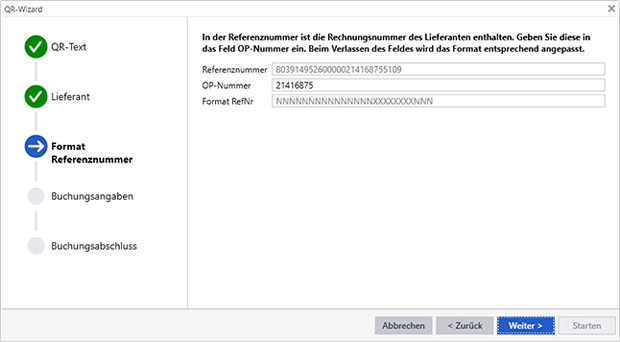
Add bank details, reference number format

Support for placeholders in the booking text

Document number either OP number or Sage Standard (increment)

Error corrections

Simply scan


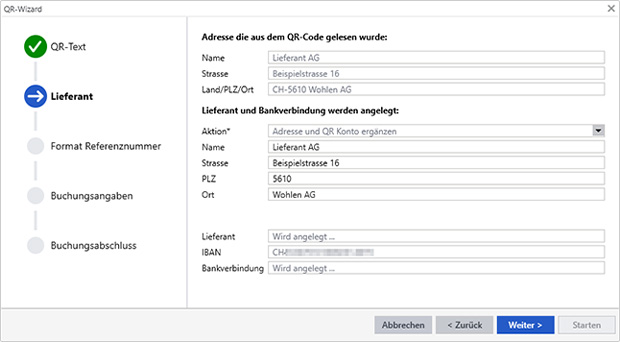
The assistant integrates perfectly into the booking entry of Sage 100. Scan a QR invoice. The information from the QR code is then transferred to the familiar standard Sage 100 entry screen. You can then complete the booking directly and unchanged or adjust it as you wish, as with manual entry.

L100 QRPlus

Automatic maintenance of master data


Are the bank details or the supplier not yet available in the Sage 100 master data? Then the wizard creates the bank details. If necessary, it enters the entire supplier with all the required information. This is all done without manual input.

L100 QRPlus

Information always visible


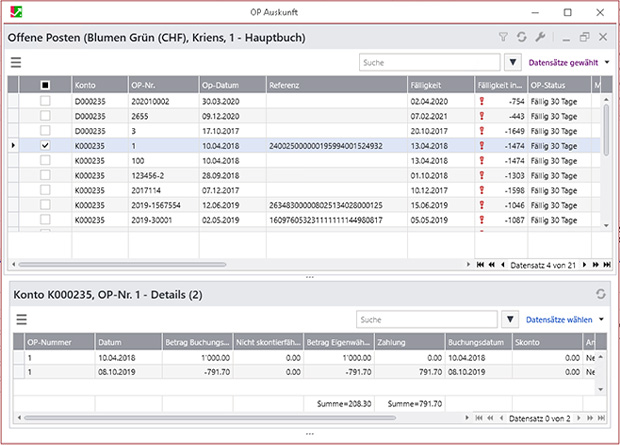
The system automatically saves the reference number of the QR-bill for invoices entered using the wizard. This is then available in the payment process. If an invoice is entered manually or transferred from merchandise management, the number may be missing. For this reason, the wizard extends the open item information by displaying the reference number. You can use this display to check which open items are missing a reference number.

L100 QRPlus

Connected to merchandise management

Do you carry out invoice verification in merchandise management? Then the assistant is also the right tool for your employees. The reference number required for the payment is saved in the purchasing invoice in merchandise management. It is transferred to the accounting system when the document is transferred.

Digital invoice approval with the "visualization option"

Invoice approvals are part of the everyday life of every company. This process is often still paper-based and causes effort and annoyance. The invoice can no longer be found, you run after the paper or the signature and perhaps miss the discount deadline.

By digitizing the process, these problems can be avoided and the process can be accelerated and simplified.

Implementation is extremely simple with the fee-based option Vization for the basic L100 QRPlus module. The final step of invoice verification before an invoice is paid becomes child's play. Accounting staff receive confirmation of an order or purchase with just a few clicks.

L100 QRPlus scans the QR code directly from the PDF of the invoice using the viewer. It then attaches the invoice document to the booking.

View bookings


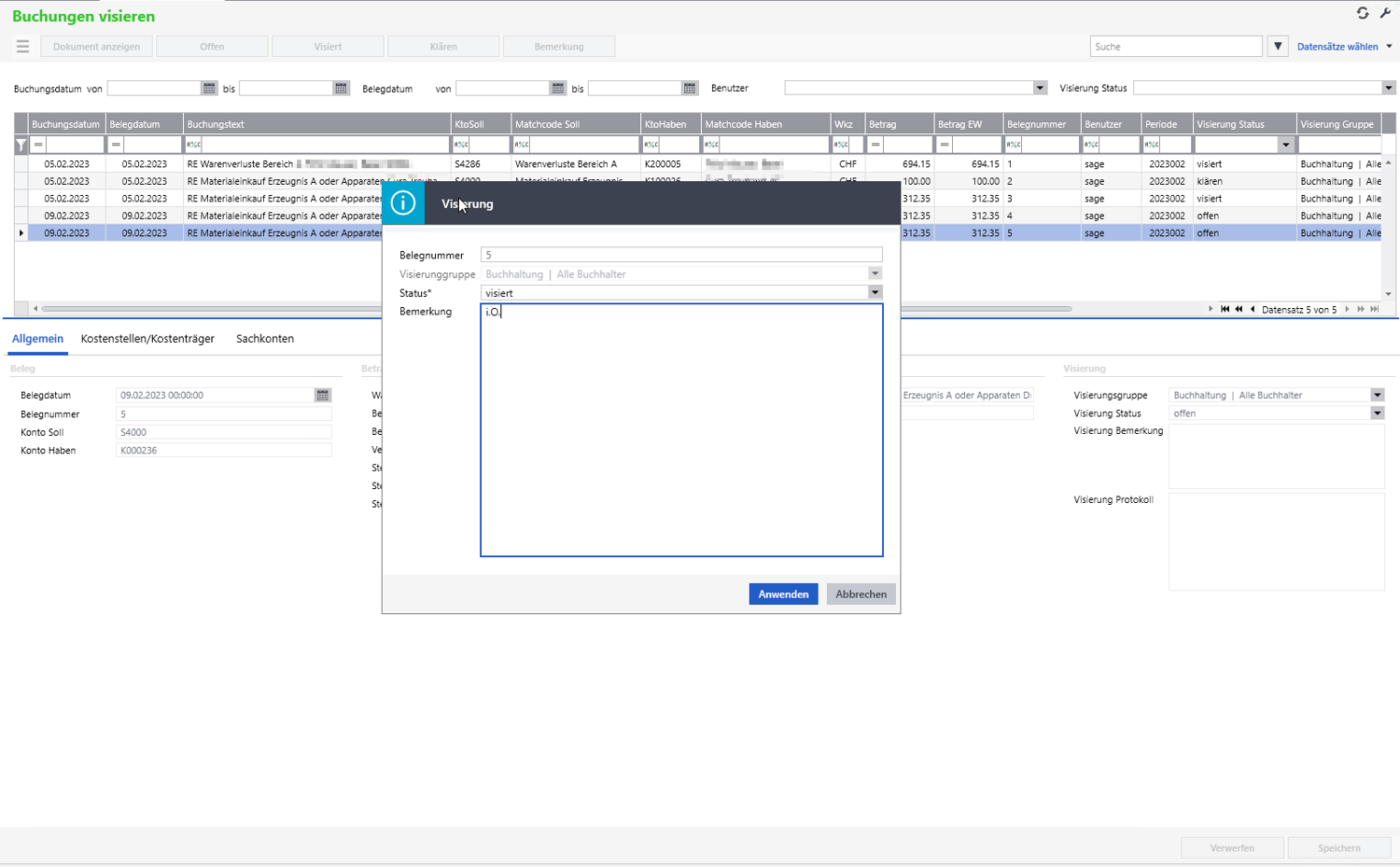
The entire process is then handled via a single "Confirm bookings" screen.

Each employee only sees the invoices that are important to them and can view the PDF of the invoice and approve it via a button or initiate a clarification process with a comment.

The accounting department sees all invoices in the sighting process at a glance and can process the approved invoices directly.

L100 QR Plus

Advantages of L100 QRPlus

Save time and avoid errors by automating the booking process

Automatic creation of bank details for existing suppliers

Automatic master data creation of new suppliers complete with bank details

User-friendly, simple assignment of the invoice number in the supplier's reference number

Direct entry of allocation postings (SDiv)

The wizard uses the usual booking entry screen with all options, e.g. for the booking text

Benefit from the new Sage 100 technology in the assistant too, e.g. through the scalability of the windows

The reference number is displayed directly in open item information

  • L100 QRPlus module

    CHF 1'950

    plus maintenance costs of CHF 420/year

    Integrated functions

    • QR wizard in the booking entry
    • Automatic creation / updating of bank details
    • Integration into the information system
    • Integration into document entry for purchasing

  • L100 QR Plus Option Sight

    CHF 1'400

    plus maintenance costs of CHF 360/year

    Contents

    • Digital invoice approval

    • Invoice as PDF

  • L100 QRPlus configuration

    approx. CHF 1'000

    according to order

    Contents

    • installation
    • Configuration
    • Employee training

Personal Consultation

Reto Hofstetter and his team specialize in all matters related to the Sage 100 business software. As a certified Sage Competence Center and certified Sage Developer Partner, he handles all aspects of implementing and customizing your business software. Contact us today!

Get in touch
Reto Hofstetter

Reto Hofstetter
CEO & Partner